Scraping Fortune 500 companies executive team
In this example we’ll be scraping data for Fortune 500 companies from 50Pros. More specifically we’ll be scraping the executive teams for all the companies.
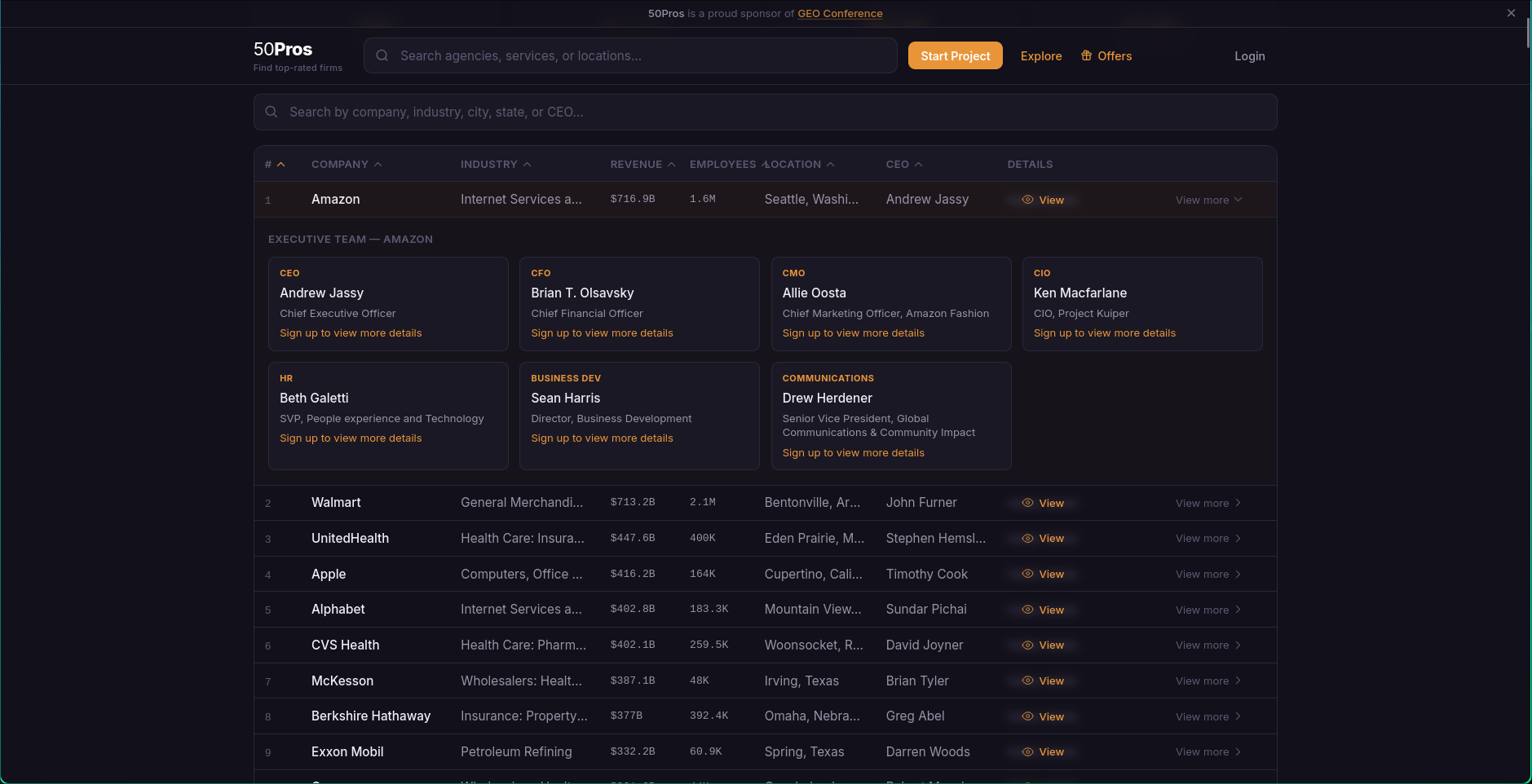
The first step is taking a look at the website to figure out the layout and identifying the information we want to obtain.
For this website the executive team for each company is revealed when the company row is clicked. We can do this by running the following snippet in the browser console
document.querySelectorAll('.group').forEach((el) => {el.click();})The final config is below:
{
  "id": "50pros.com__fortune500__ad270a6e",
  "schemaVersion": "2.0.0",
  "revision": 1,
  "url": "https://www.50pros.com/fortune500",
  "createdAt": "2026-03-21T13:19:22.112Z",
  "updatedAt": "2026-03-21T13:19:22.112Z",
  "selectors": [
    {
      "id": "g_E60uqc",
1      "container": "td[colspan=\"9\"] .grid > div",
      "fields": [
        {
          "id": "f_8gaIvs",
          "name": "Role",
          "selector": ".font-bold",
          "type": "single",
          "extract": "text",
          "required": false
        },
        {
          "id": "f_5zx_hr",
          "name": "Person Name",
          "selector": " div .text-sm",
          "type": "single",
          "extract": "text",
          "required": false
        },
        {
          "id": "f_fhIqid",
          "name": "Position Name",
          "selector": " div .text-xs",
          "type": "single",
          "extract": "text",
          "required": false
        },
        {
          "id": "f_qn54EZ",
          "name": "Company Name",
2          "selector": "../../../../preceding-sibling::tr[1]/td[2]/a/text()",
          "type": "single",
          "extract": "text",
          "required": false
        }
      ]
    }
  ],
  "options": {
    "waitforNetworkIdle": true,
    "scrollToBottom": false,
    "runJavaScript": true,
    "pageDelayMs": 3000,
    "timeoutMs": 60000,
    "maxRetries": 2,
    "appendData": true
  },
  "pagination": {
    "mode": "none"
  },
  "output": {
    "format": "json",
    "mergeStrategy": "join",
    "flatten": true
  }
}- 1
- We define a container selector (line 14) in this case because the information for each executive team member is encapsulated in a recognizable DOM element. The rest of the fields are can be obtained using the interactive picker or directly inspecting the relevant parts of the page.
- 2
- The “Company Name” (lines 32-35) field requires special attention. Since we have defined a container element, we use an XPath selector to go up in the document tree.
We use a relative axis to go up in the tree before using preceding-sibling which selects siblings of the current node within the same parent. In our particular case we find the first tr element that’s before the current node after navigating up in the tree.
The first 20 items of the resulting data are:
| Role | Person Name | Position Name | Company Name |
|---|---|---|---|
| CEO | Andrew Jassy | Chief Executive Officer | Amazon |
| CFO | Brian T. Olsavsky | Chief Financial Officer | Amazon |
| CMO | Allie Oosta | Chief Marketing Officer, Amazon Fashion | Amazon |
| CIO | Ken Macfarlane | CIO, Project Kuiper | Amazon |
| HR | Beth Galetti | SVP, People experience and Technology | Amazon |
| Business Dev | Sean Harris | Director, Business Development | Amazon |
| Communications | Drew Herdener | Senior Vice President, Global Communications & Community Impact | Amazon |
| CEO | John Furner | President & CEO | Walmart |
| CFO | Brett Biggs | Executive Vice President and Chief Financial Officer | Walmart |
| CMO | William White | Chief Marketing Officer | Walmart |
| CIO | Jerry R. Geisler Iii | Senior Vice President and Chief Information Security Officer | Walmart |
| HR | Donna Morris | Executive Vice President, Chief People Officer | Walmart |
| Business Dev | Amit Patel | Vice President of Business Development and Strategic Partnerships | Walmart |
| Communications | Allyson Park | Chief Communications Officer | Walmart |
| CEO | Stephen Hemsley | – | UnitedHealth |
| CFO | John Rex | Executive Vice President and Chief Financial Officer | UnitedHealth |
| CMO | Terry M. Clark | Chief Marketing Officer | UnitedHealth |
| CIO | Ted Bredikin | CIO | UnitedHealth |
| HR | Erin Mcsweeney | Executive Vice President and Chief People Officer | UnitedHealth |
| Business Dev | Yasmin Dharamsi | Vice President Of Business Development | UnitedHealth |