Table of Contents
Open Table of Contents
Preliminaries
In order to try and solve one of these puzzles, we first need to create one. We could either write our own implementation of the game (doable but a lot of extra work) or extract puzzles from Simon Tatham’s version. Thankfully the code for the game is open-source so we can try the latter. A copy of the code for Simon Tatham’s puzzle collection can be obtained with:
git clone https://git.tartarus.org/simon/puzzles.gitWe can use the already defined dump_grid function by making some changes to flood.c. Save the
following to a file and run git apply <somefile>
diff --git a/flood.c b/flood.c
index bef45f3..938a580 100644
--- a/flood.c
+++ b/flood.c
@@ -287,7 +287,7 @@ static void free_scratch(struct solver_scratch *scratch)
     sfree(scratch);
 }

-#if
+#if 1
 /* Diagnostic routines you can uncomment if you need them */
 void dump_grid(int w, int h, const char *grid, const char *titlefmt, ...)
 {
@@ -658,6 +658,8 @@ static game_state *new_game(midend *me, const game_params *params,
     state->solnpos = 0;
     state->soln = NULL;

+    printf("%d by %d with %d -> %d\n", state->w, state->h, params->leniency ,state->movelimit);
+    dump_grid(w, h, state->grid, "");
     return state;
 }
After the change, we can compile the game following the instructions in the project’s README. To
collect the data we want, we run the game while redirecting the output to a file i.e.
./flood > easy.txt. A new puzzle is produced and written to this file when the program starts and
each time we start a new game.
I produced a few puzzles of varying difficulty and grid size using the method above. In order to load the puzzles into our program, we need to parse text structured as follows.
12 by 12 -> 23
  220512241115
  050301010135
  145334435442
  055410020501
  115015101341
  540123454434
  005154123544
  342420355535
  412520311103
  554304552042
  255022011245
  212510012340
The first line represents the dimensions of the board (12 wide and 12 tall) and the maximum number of moves needed to solve the puzzle (23). The lines that follow correspond to the actual board. Each individual number represents a cell in the grid with the value corresponding to a particular color.
Given the nature of flood, the most obvious way to represent the board is with a 2D list. Each row
corresponding to a list and each column an entry within the list. The first row for the above puzzle
would be [2, 2, 0, 5, 1, 2, 2, 4, 1, 1, 1, 5].
However, since in order to solve the puzzle we need to mutate the state of the board frequently using a list would necessitate copying every time we pass the board to a function. The reason for this is that lists in Python are passed by reference and not by value.
a = [1, 2, 3, 4, 5]
def f(some_list):
    some_list[0] = 6
    return some_list

f(a)        # => [6, 2, 3, 4, 5]
a == f(a)   # => True
Instead of using a list, we instead implement a simple Grid data structure to hold the board.
class Grid:
    def __init__(self, grid):
        self._grid = tuple(tuple(row) for row in grid)
        self._rows = len(grid)
        self._cols = len(grid[0]) if grid else 0

    def __getitem__(self, index):
        row, col = index
        return self._grid[row][col]

    def __setitem__(self, row, col, value):
        new_grid = [list(row) for row in self._grid]
        new_grid[row][col] = value
        return Grid(new_grid)

    def __iter__(self):
        """Iterator over grid positions."""
        for i in range(self._rows):
            for j in range(self._cols):
                yield (i, j)

    def __repr__(self):
        return f"Grid({[list(row) for row in self._grid]})"

    # necessary for using Grid as a dict key
    def __hash__(self):
        return hash(tuple(self[i, j] for (i, j) in iter(self)) + (self.rows, self.cols))

    # looks odd but we'll see why it's necessary later
    def __lt__(self, other):
        return False

    @property
    def rows(self):
        return self._rows

    @property
    def cols(self):
        return self._cols

    def set_mul(self, positions, value):
        """Change multiple grid positions."""
        new_grid = [list(row) for row in self._grid]
        for row, col in positions:
            new_grid[row][col] = value
        return Grid(new_grid)

    def is_valid(self, pos):
        """Check if position is on grid."""
        row, col = pos
        return (0 <= row < self._rows) and (0 <= col < self._cols)
When parsing the puzzle, other than the board itself we also keep track of the dimensions of the puzzles (although this can be inferred by the shape of the grid), and the maximum amount of moves needed to solve the puzzle.
import re

easy = "puzzles/easy_5.txt"
medi = "puzzles/medium_5.txt"
hard = "puzzles/hard_5.txt"

def parse_header(header):
    p = re.compile(r"(?P<width>\d{1,2}) by (?P<height>\d{1,2}) -> (?P<mmoves>\d{1,2})")
    if m := re.match(p, header):
        return {k: int(v) for k, v in m.groupdict().items()}

def parse_puzzles(file):
    puzzles = []
    with open(file, "r") as fp:
        while line := fp.readline():
            if line.strip():
                meta = parse_header(line.strip())
                board = []
                for _ in range(meta["height"]):
                    r = list(map(int, iter(fp.readline().strip())))
                    board.append(r)
                puzzles.append(meta | {"board": Grid(board)})
    return puzzles

peasy = parse_puzzles(easy)
pmedi = parse_puzzles(medi)
phard = parse_puzzles(hard)

peb0 = peasy[0]["board"]
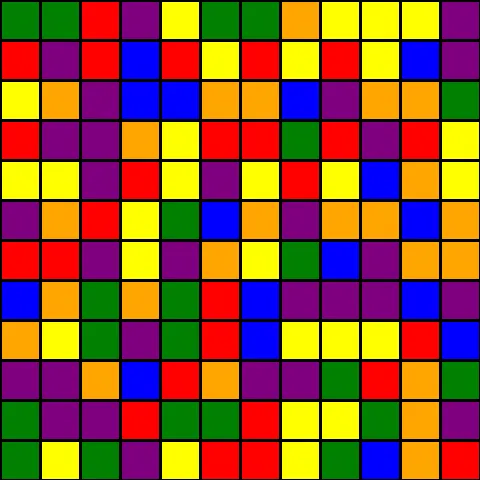
The final preliminary step we need to complete is displaying the board, since the original puzzle has a graphical form we’ll replicate it. We also add the ability to highlight specific cells within the grid with a white border.
from PIL import Image, ImageDraw, ImageFont

color_map = ["red", "yellow", "green", "blue", "orange", "purple"]

def show_puzzle(board, highlight=None, cell_width=40, debug=False):
    width = board.cols
    height = board.rows
    image = Image.new("RGB", (cell_width * width, cell_width * height), (0, 0, 0))
    draw = ImageDraw.Draw(image)
    fnt = ImageFont.truetype("/usr/share/fonts/TTF/FiraCode-Bold.ttf", size=16)
    y0 = 0
    y1 = cell_width
    x0 = 0
    x1 = cell_width
    for i, j in board:
        x0 = cell_width * j
        y0 = cell_width * i
        x1 = cell_width * (j + 1)
        y1 = cell_width * (i + 1)
        if highlight is not None and (i, j) in highlight:
            draw.rectangle(
                [x0, y0, x1, y1],
                fill=color_map[board[i, j]],
                outline="white",
                width=4,
            )
        else:
            draw.rectangle(
                [x0, y0, x1, y1],
                fill=color_map[board[i, j]],
                outline="black",
                width=2,
            )
        if debug:
            draw.text(
                (x0 + cell_width // 2, y0 + cell_width // 2),
                f"{i}, {j}",
                anchor="mm",
                fill=(0, 0, 0, 255),
            )
    return image
We can view one of our loaded puzzles by using .show() or .save(file) on the image returned by
show_puzzle e.g show_puzzle(peb0).show()
Simulating Moves
Since we can now visualize the board, we need to be able to change the state of the board i.e. play the game. You can see an example of how the game is played below:
In order to simulate the rules of the game we need to be able to do the following:
- Find cells neighbouring a particular position.
- Find all cells connected to a position by color i.e. a cluster.
- Find cells neighbouring a cluster.
The first step involves some simple math with a check (Board.is_valid) to make sure the positions
are within our board grid. We use a set to ensure that no positions are repeated and to also make
testing for the presence of a particular position fast and easy.
def find_neighbours(position, board):
    neighbourhood = [
        (0, -1),
        (-1, 0),
        (+1, 0),
        (0, +1),
    ]
    return set(
        filter(
            lambda x: board.is_valid(x),
            [(i[0] + position[0], i[1] + position[1]) for i in neighbourhood],
        )
    )
Finding the cluster containing a position is a little more involved. We start with said position as the only member of the cluster and extending with that position’s neighbours with the same color. This is repeated for each of the neighbours that are added to the cluster. We use a set for the same reasons as above.
def find_cluster_containing(position, board):
    cluster = {position}
    color_matches = lambda p: board[p] == board[position]
    neighbours = find_neighbours(position, board)
    while neighbours:
        n = neighbours.pop()
        if color_matches(n):
            cluster.add(n)
            neighbours |= find_neighbours(n, board) - cluster
    return cluster
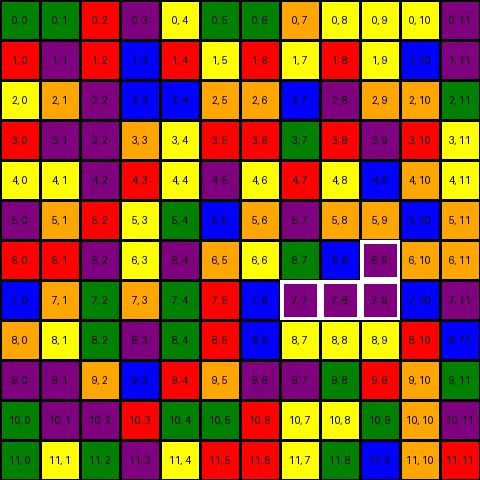
We can try out the function by finding and highlighting the cluster containing the position (7, 9)
with show_puzzle(peb0, debug=True, highlight=find_cluster_containing((7, 9), peb0)).show()
One more additional function that might be useful is being able to find the neighbours of a cluster.
We can do this by finding the neighbours of each member, filtering any duplicates and combining them
into a single set. We use some FP to make this easy but find_cluster_neighbours2 shows the
equivalent imperative version.
from functools import partial, reduce
from operator import or_

def find_cluster_neighbours(cluster, board):
    return (
        set(reduce(or_, map(partial(find_neighbours, board=board), cluster))) - cluster
    )

def find_cluster_neighbours2(cluster, board):
    res = set()
    for i in cluster:
        res |= find_neighbours(i, board)
    return res - cluster

c1 = find_cluster_containing((7, 9), peb0)
i1 = show_puzzle(peb0, debug=True, highlight=find_cluster_neighbours(c1, peb0))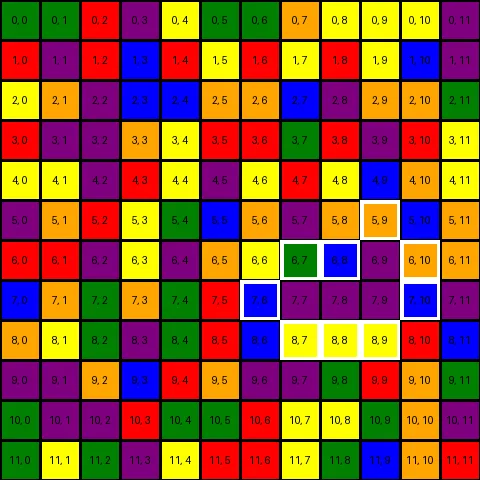
With all these functions defined we can finally implement one to make a move. A move is made by
looking for the cluster containing the cell (0, 0) then changing it’s color to a new one, which
effectively extends the cluster.
def move(color, board):
    main_cluster = find_cluster_containing((0, 0), board)
    color = color_map.index(color) if isinstance(color, str) else color
    cluster_neighbours = set()
    for i in main_cluster:
        cluster_neighbours |= find_neighbours(i, board)
    if any([board[i] == color for i in cluster_neighbours]):
        return board.set_mul(main_cluster, color)
    return board

peb00 = move("red", peb0)
i2 = show_puzzle(peb00)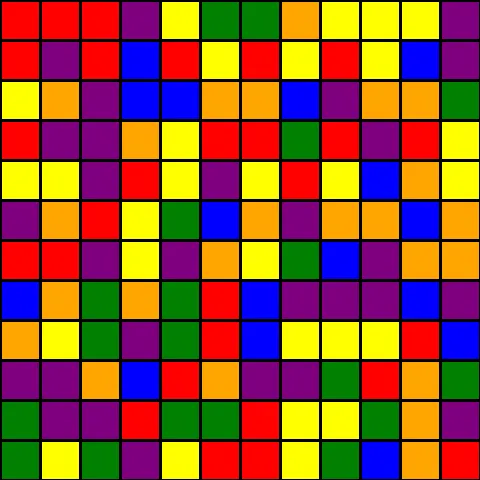
To create a way to ‘play’ the game we use a simple loop that shows the board, reads user input and
calls move until the board is solved.
def find_color(c):
    return next(i for i in color_map if i[0] == c)

def play(board):
    while not is_solved(board):
        i = show_puzzle(board)
        i.show()
        choices = [i[0] for i in color_map]
        color = input(f"pick a color {' '.join(choices)}> ")
        if color in choices:
            board = move(board, find_color(color))
        else:
            return board
    return
Writing A Solver
The easiest method to solve a problem of this nature would be the brute-force approach. We’d generate every single move possible for a particular puzzle and pick the sequence of moves that lead to a solution the fastest. Sound pretty simple.
The downside of this approach and the reason it’s not used much in practice is that enumerating every possibility may be impossible, take too much time, or use too much memory. The advantage of this approach is that by enumerating and exploring all possible options, we can guarantee finding an optimal solution if one exists.
An optimal solution refers to a solution that is the best according to a specific criteria. In our case the optimal solution would be the one with the smallest series of color changes that transforms the entire grid into a singular color.
Finding a solution involves looking through the different states of the problem resulting from a particular action. In our case we’re looking through the states of the board after a move is made. These states are commonly referred to as the search space and can be thought of as a graph where the nodes are individual states and the edges represent actions that transition from one state to another.
The specific way we choose to look through the search space is what distinguishes different algorithms i.e Depth-First Search or Breadth-First Search. As you may have already guessed from the title we use the A* algorithm to limit how much of the search space we look through while still being able to find a reasonable solution.
The A* Algorithm
If we look at the description from the WikiPedia page:
A* is an informed search algorithm, or a best-first search, meaning that it is formulated in terms of weighted graphs: starting from a specific starting node of a graph, it aims to find a path to the given goal node having the smallest cost (least distance travelled, shortest time, etc.). It does this by maintaining a tree of paths originating at the start node and extending those paths one edge at a time until the goal node is reached.
Calculating the cost of each path is where A* differs from something like Dijkstra’s algorithm. Specifically it picks a path while taking into account an additional value from a heuristic. This extra consideration minimizes how much of the search space we need to explore to find a solution.
Implementation
We’ll jump right into the code before explaining what each part does.
import heapq
from icecream import ic

def find_all_clusters(board):
    positions = set(iter(board))
    while positions:
        pos = positions.pop()
        c = find_cluster_containing(pos, board)
        positions -= c
        yield c

# the heuristic function
def cluster_count(board):
    main = find_cluster_containing((0, 0), board)
    count = 0
    for c in find_all_clusters(board):
        if c == main:
            continue
        count += 1
    return count

def a_star_solve(initial_board, heuristic=cluster_count):
    open_set = []
    heapq.heappush(open_set, (0, initial_board))
    came_from = {}
    g_score = {initial_board: 0}
    f_score = {initial_board: heuristic(initial_board)}

    while open_set:
        current = heapq.heappop(open_set)[1]

        if is_solved(current):
            return reconstruct_path(came_from, current)

        cluster = find_cluster_containing((0, 0), current)
        # valid moves
        maybe_colors = {current[x] for x in find_cluster_neighbours(cluster, current)}
        for next_board in [move(c, current) for c in maybe_colors]:
            tentative_g_score = g_score[current] + 1
            if next_board not in g_score or tentative_g_score < g_score[next_board]:
                came_from[next_board] = current
                g_score[next_board] = tentative_g_score
                f_score[next_board] = tentative_g_score + heuristic(next_board)
                e = (f_score[next_board], next_board)
                if e not in open_set:
                    heapq.heappush(open_set, e)
    return None

def reconstruct_path(came_from, current):
    cluster = find_cluster_containing((0, 0), current)
    color = current[cluster.pop()]
    total_path = [color]
    while current in came_from.keys():
        current = came_from[current]
        cluster = find_cluster_containing((0, 0), current)
        color = current[cluster.pop()]
        total_path.append(color)
    return total_path[::-1][1:]

def is_solved(board):
    return len(set(board[i, j] for (i, j) in board)) == 1
Before going over the details let’s try and run the solver. We save the result in a GIF to make it easier to inspect.
sol = a_star_solve(peb0)    # [2, 0, 5, 0, 1, 4, 5, 2, 0, 4, 1, 3, 5, 2, 0, 1, 4, 3, 5, 0, 2, 3]
b = peb0

def show_solution(sol, board, outfile="solve.gif"):
    imgs = []
    b = board
    for c in sol:
        b = move(c, b)
        imgs.append(show_puzzle(b))
    imgs[0].save(
        outfile, save_all=True, append_images=imgs[1:], optimize=False, duration=500
    )

show_solution(sol, peb0, "easy-1-solve.gif")
Explanation, Evaluation and Improvement
From the GIF above we can see that our implementation does indeed find a viable solution for the
flood puzzle. We can further verify this by making sure that the returned solution is shorter than
the maximum moves expected. (len(sol) <= peasy[0]['mmoves']).
Our implementation matches pretty closely with the pseudocode in the WikiPedia page. Some important things to keep in mind are:
- The heuristic function can be changed to improve the performance of the whole algorithm. In our case we count the number of unique clusters remaining on the board.
heapqis used for the priority queue. We added__lt__toGridearlier to simplify usage ofheapqwhich does comparison with<. The way__lt__is implemented means that selecting an item from the queue is based entirely on the f-score of the board. This shouldn’t make a difference but I may be missing something.
We can try and graph how our heuristic performs across the different puzzle difficulties. To do that we’ll first produce the data then plot a graph using the vega-lite online editor.
def generate_data(puzzles, difficulty="easy"):
    data = []
    for i, p in enumerate(puzzles):
        data.extend(
            [
                {
                    "difficulty": difficulty,
                    "type": "expected",
                    "value": p["mmoves"],
                    "index": i,
                },
                {
                    "difficulty": difficulty,
                    "type": "actual",
                    "value": len(a_star_solve(p["board"])),
                    "index": i,
                },
            ]
        )
    return data

data = (
    generate_data(peasy, "easy")
    + generate_data(pmedi, "medium")
    + generate_data(phard, "hard")
)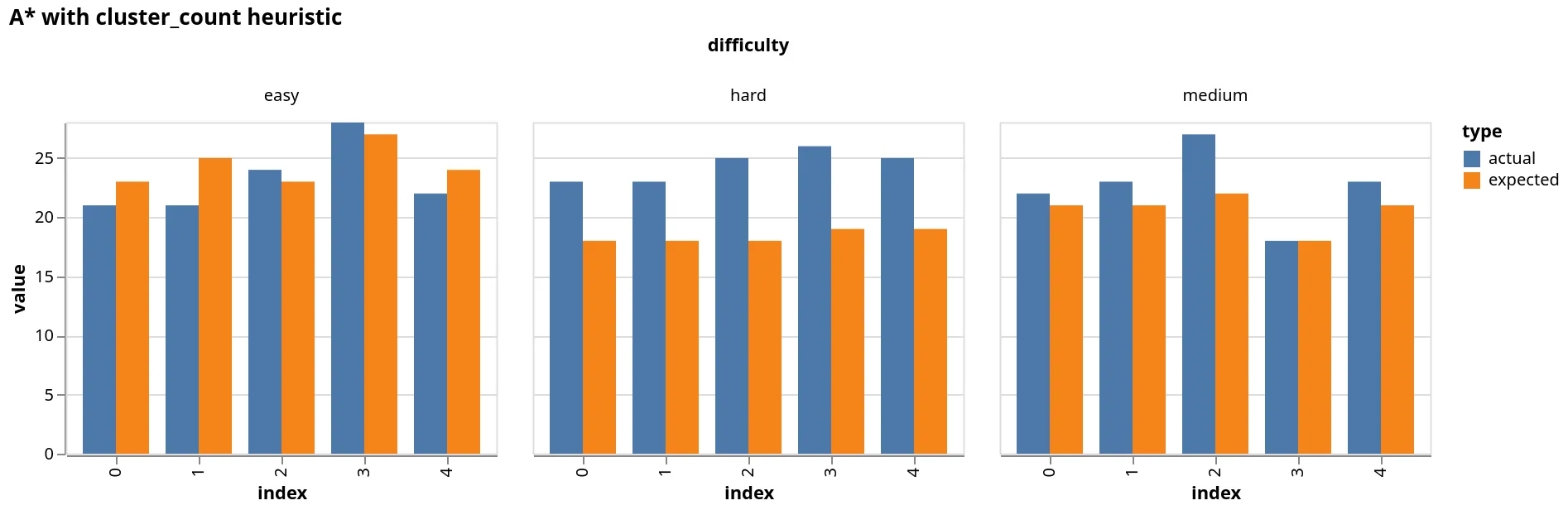
As we can see our heuristic doesn’t really perform as well as we’d hope. The good news is that we
can use a different heuristic. I tried a couple different ones such as evaluating the size of the
main cluster but none that matched the performance of cluster_count. From what I saw Simon Tatham
uses backtracking search which works very well. I believe a heuristic that uses some form of
lookahead would perform similarly. I’ll leave that as an exercise for the reader (😆). Anyone with
some other interesting heuristics can leave a comment below.
I hope you found this article illuminating, I’ll catch you in the next one.
Final Thoughts
- I used Literate Programming to write the code and text for this article through Quarto. I write Quarto markdown in neovim with the plugins quarto-nvim and vim-slime. The former allows syntax highlighting and language server support in code blocks within markdown and the latter lets you run code from your editor in a separate REPL.
- I’ll be exploring how to solve some of the other puzzles in Simon Tatham’s collection using different of approaches. Stay tuned for more.
- The repo for this project can be found on GitHub