Table of Contents
Open Table of Contents
Understanding the problem
Before we get started, it is important to understand that the PDF format differs significantly from ePUB and HTML. The PDF format is designed to enable the exact reproduction of the source material’s content and layout regardless of the final output medium (screen or paper). Unlike HTML files where layout is left largely to whichever program is displaying the file, PDF files describe exactly where on the screen (or page) all text and images should be rendered.
There are of course good reasons for this, but it can make extracting data harder depending on choices made by the PDF’s creator. We can’t conveniently look for some tag as in HTML. It’s not a hopeless situation though as there are some techniques we can make use of. Primarily we’ll be relying on identifying content and layout patterns shared by the targets of our extraction.
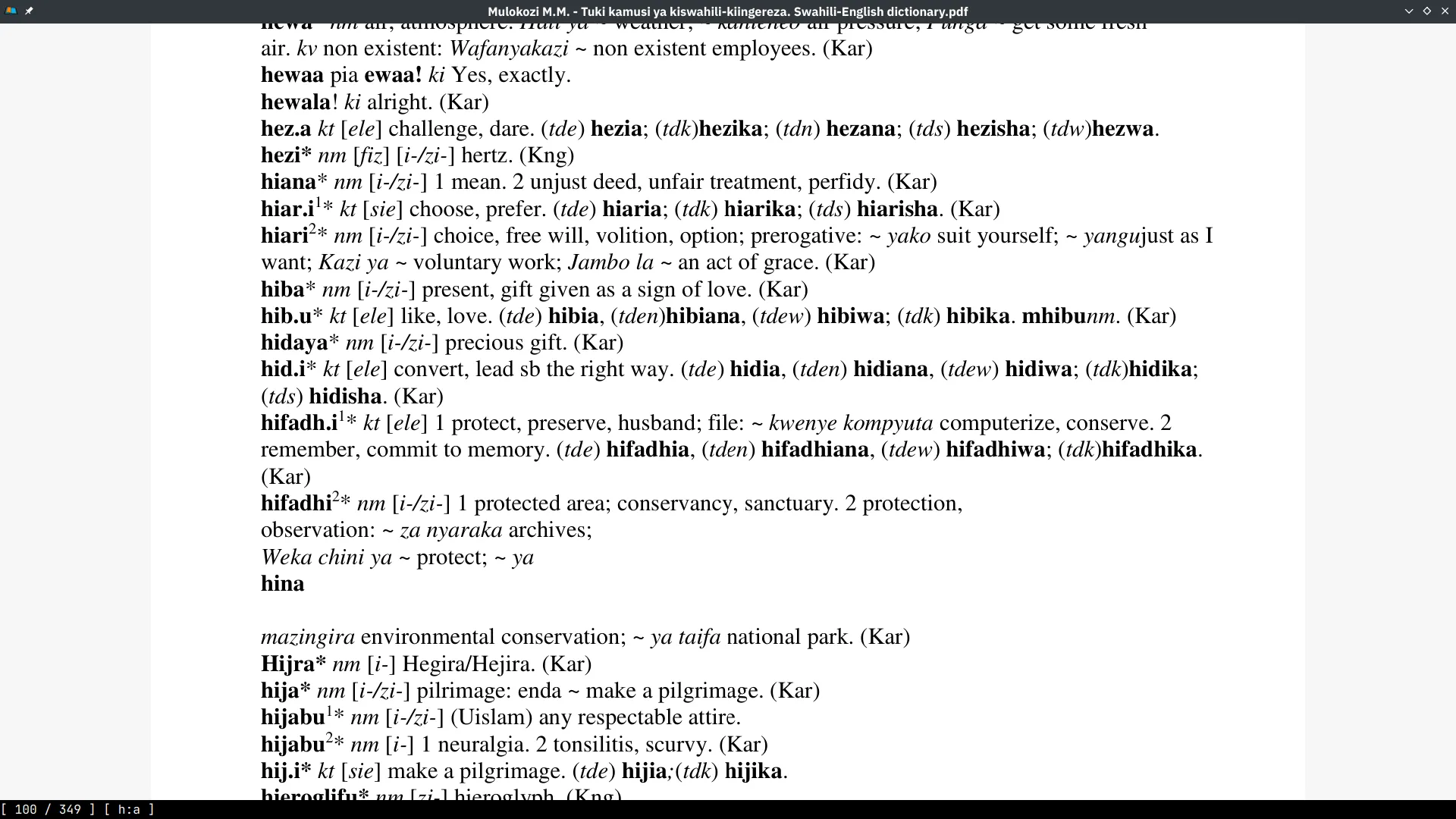
The first step unsurprisingly, is having a look at the PDF file. You can open it in you viewer of choice. I favour Zathura but have recently been trying out Sioyek.
Two useful tools for gaining an insight into the underlying structure of a PDF file are the pdfquery Python library and the Java GUI application pdfbox. pdfquery allows you to convert the contents of a PDF file into XML format making human inspection easier. Additionally, the library allows you to extract specific parts of the PDF file using a JQuery-like interface.
pdfbox on the other hand is a general tool for working with PDF files. Some of its functionality
includes:
- Encryption and Decryption of PDF files.
- Converting PDF files to images.
- Splitting and Merging multiple PDF files.
- Debugging PDF files which involves inspecting the internal structure of a PDF document in a GUI.
One other useful utility is mutool which is part of mupdf. It shares a lot of overlap with pdfbox but is CLI only. An example is using it to extract a single page from a PDF:
mutool convert -o test_p100.pdf swahili-english.pdf 100We can open this file with pdfbox debug.
pdfbox debug test_p100.pdf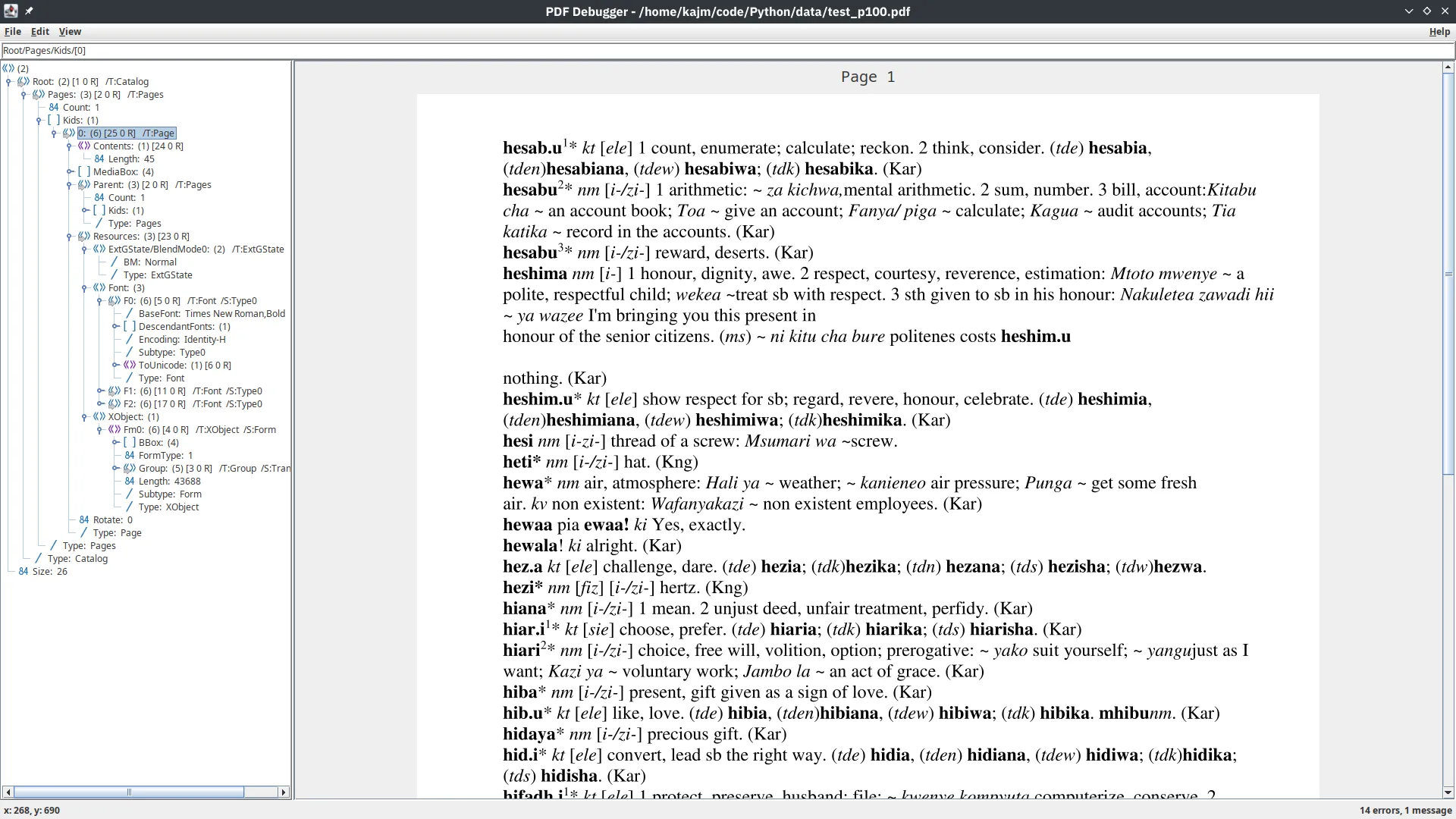
The pdfbox feature I’ve found most useful is being able to find the approximate (x, y)
coordinates of various elements. The bottom left of the GUI window shows the position of the mouse
cursor using the PDF file’s dimensions as a frame of reference.
On the other hand with pdfquery we can output the XML representation of our test page.
import pdfquery

pdf = pdfquery.PDFQuery('test_p100.pdf')
pdf.load()
pdf.tree.write('test_p100.xml')
We can view the resulting XML as-is but I use tidy to improve the
formatting of the resulting XML before piping the results to bat for syntax highlighting.
tidy -xml -indent test_p100.xml | bat -l xml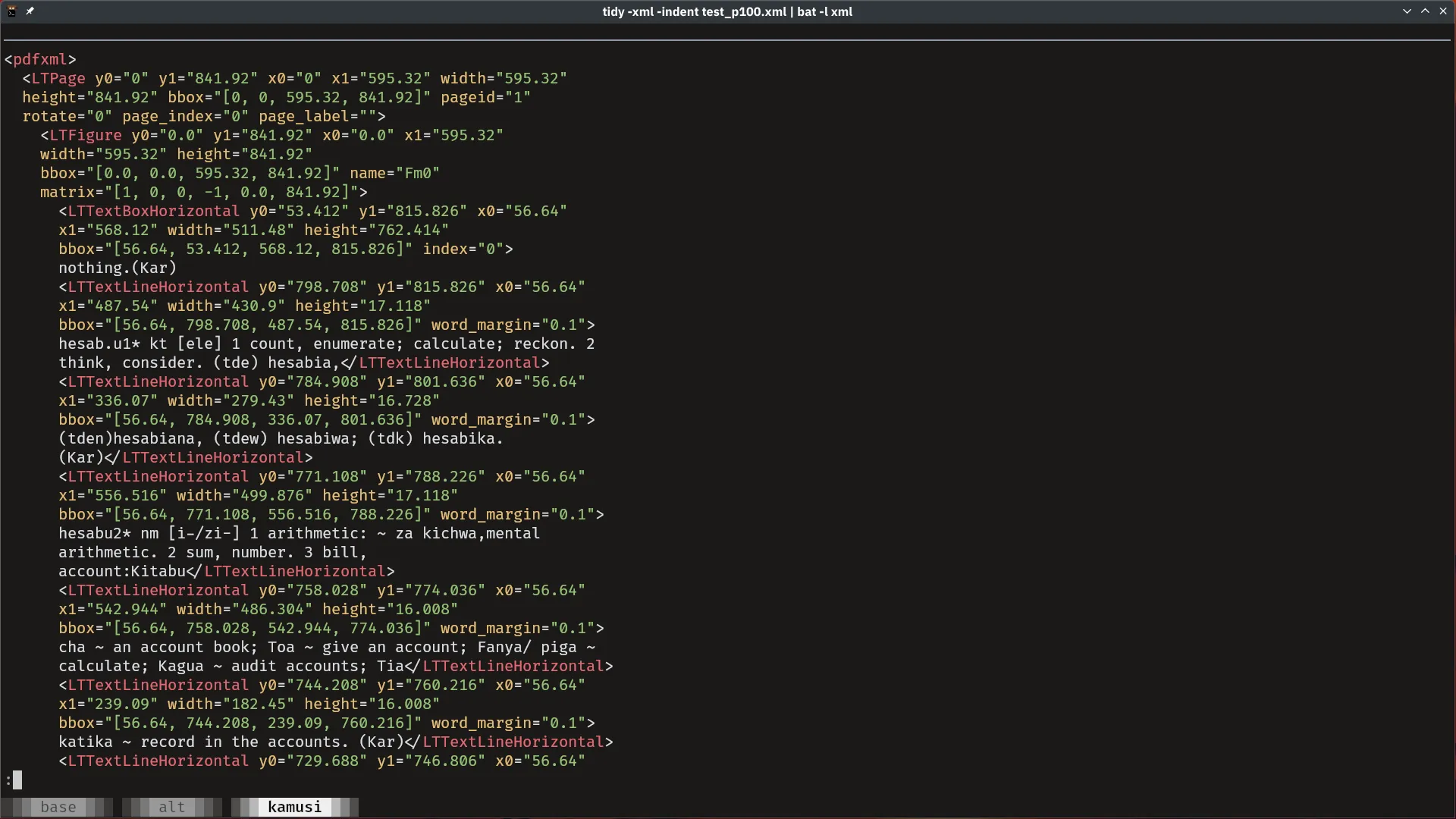
At this point - if you’re lucky - you should be able to identify some attribute of a PDF object based on which to extract the relevant parts from the PDF. An example of this can be found in this article.
Our case requires more effort. We use the another library
pypdf which allows us to extract text using a
custom function to control which parts of a page we want to process.
Our function simply checks if the text in an element is not empty and builds a dictionary with the text as well as some other useful attributes adding it to a list we use to keep track of all the text we’ve found in the PDF file.
from pypdf import PdfReader

def visitor_body(
    text: str,
    cm: [float],
    tm: [float],
    font_dict: dict[str, Any],
    font_size: float,
    page_no: int,
    parts: [Any],
):
    if cleaned_text := str.strip(text):
        parts.append(
            {
                "text": cleaned_text,
                "font": font_dict["/BaseFont"],
                "dimensions": tm,
                "page": page_no,
            }
        )
    return
The first 5 arguments are all that are required by the visitor supplied to
extract_text but we use 2
additional arguments page_no and parts. The former is for keeping track of which page each piece
of text is found on and the latter is the list used to collect all the text pieces. We dump parts
into a JSON file to facilitate the later stages of extraction.
import json
from functools import partial

def process_pdf():
    reader = PdfReader("swahili-english.pdf")
    parts = []
    for i, page in enumerate(reader.pages):
        page.extract_text(
            visitor_text=partial(visitor_body, page_no=i, parts=parts)
        )
    with open("data/pdf_parts.jsonl", "w") as fp:
        for part in parts:
            json.dump(part, fp)
            fp.write("\n")
    return parts
Here’s an example of how each part appears:
shuf data/pdf_parts.jsonl | head -1 | jq .{
"text": "bombo",
"font": "/Times New Roman,Bold",
"dimensions": [1.0, 0.0, 0.0, 1.0, 56.64, 595.78],
"page": 27
}Recognizing patterns of the desired data
With the text parts extracted from the PDF file, we can re-open the file in a viewer to take a closer look.
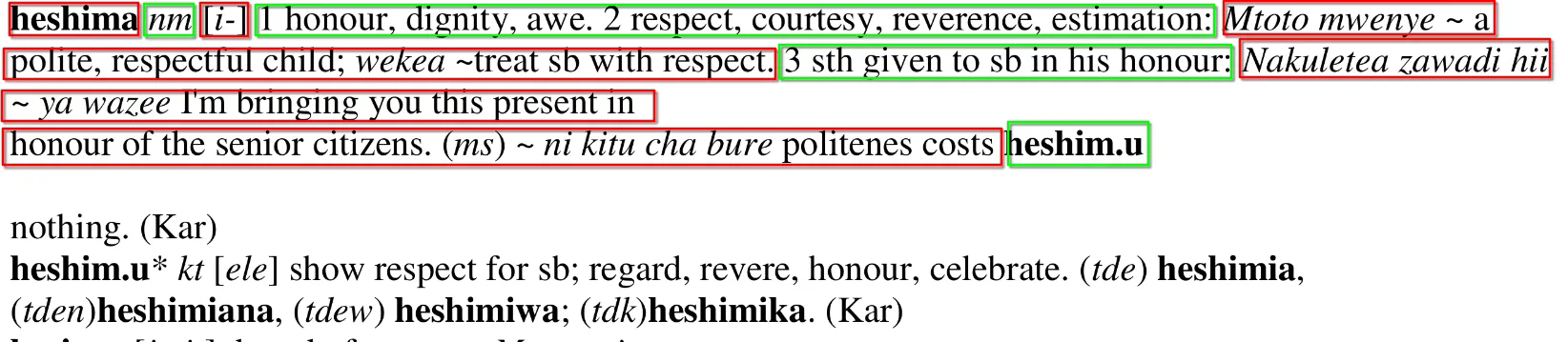
From the above screenshot we can see that some of the data we be interested in extracting include:
- The Swahili word.
- The word’s part of speech.
- The word’s ngeli (noun class).
- The equivalent English definition(s).
- Examples of the word’s usage in Swahili and English.
There is more information we’ll be trying to extract but the above are the most important.
Based on the formatting of the entries in the file, we can only rely on a few attributes to differentiate between them:
- Text position on the page e.g the Swahili word always appears roughly in the same position within a page.
- Font weight e.g Swahili words are always bold and the part of speech tags are similarly always italic.
- Relative order e.g after the Swahili word is the part of speech tag followed by the ngeli if it the word is a noun.
- Regular expression patterns e.g English definitions are numbered
Grouping Text Parts into Dictionary Entries
We use the first 2 of the above attributes to group the text parts into potential entries. With the
pdf_parts.jsonl we saved earlier, we try and find some commonality that can be used to identify
the start of each entry. Using pdfbox we find out that each entry begins with an x coordinate
roughly between 55 and 60. Loading the parts into DuckDB we can confirm this
with a simple analysis.
create table pdf_parts as
  select *
  from read_json_auto('data/pdf_parts.jsonl', format = 'newline_delimited');

select dimensions[5] as x_coord, count(*)
from pdf_parts
group by x_coord
order by 2 desc
limit 3;| x_coord | count_star() |
|---|---|
| 0.0 | 22784 |
| 56.64 | 19033 |
| 60.6 | 1828 |
It’s safe to assume that parts with dimensions[5] = 56.64 correspond to individual entries. We use
another query to number each part in order to produce indices. We write the indices belonging to the
potential entries to a file for use later.
select idx as word_index
from (
  select
    dimensions, font, row_number() over () as idx
  from pdf_parts
)
where dimensions[5] = 56.64 and font like '%Bold';| word_index |
|---|
| 1 |
| 6 |
| 14 |
| 20 |
| 33 |
| 37 |
| 41 |
| 48 |
| 54 |
| … |
Saving the indices can be done easily by changing the mode to csv in DuckDB and setting the
output to a file.
COPY (/* query above */) TO 'data/word_indices.txt' (DELIMITER ',', HEADER false);These indices are used to group the text parts into entries by assuming that all the parts between the indices belong together. So for example the text parts from 1 up to but not including 6 belong to a single entry.
from operator import sub
from functools import cache
from toolz import curry, flip, keyfilter, pipe

@cache
def read_parts_as_entries():
    with open("data/word_indexes.txt", "r") as fp:
        indices = fp.readlines()
        indices = pipe(
            indices,
            curry(map, str.strip),
            curry(map, int),
            curry(map, flip(sub, 1)),
            list,
        )
    with open("data/pdf_parts.jsonl", "r") as fp:
        lines = [json.loads(line) for line in fp.readlines()]

    entries = []
    for i, k in enumerate(indices):
        if i == len(indices) - 1:
            entry = lines[k:]
        else:
            entry = lines[k : indices[i + 1]]
        entries.append(
            pipe(
                entry,
                curry(map, curry(keyfilter, lambda x: x in ["text", "font"])),
                list,
            )
        )
    return words
Other than reading the indices and pdf parts, we do some processing on the contents of the two
files. For the indices we convert them to int and subtract 1 so they correspond to 0-based list
indices. For the parts we select only the text and font fields. functools.cache is used to
prevent the files from being opened and read multiple times while working in the REPL.
Parsing Individual Entry Sections
To parse the different parts of each entry we’ll be relying mostly on the relative order of the elements. My initial approach was to write a bunch of functions for processing each section, calling each as necessary which turned out being close to a recursive descent parser. Since each entry has a regular structure, our task can indeed be thought of as writing a parser.
Although this initial approach worked, it quickly became messy due to needing to handle malformed dictionary entries as well as entries with formats that differ from what we’ve seen above. The main culprit was the need to track state outside each individual function.
Before we move on to the fix, I have to mention that my tendency to favour the functional style of programming ended up being detrimental in this particular case. The requirement of writing pure functions meant that each function had to have additional arguments that were unnecessary for some but still required in order to be able to pass them to sub-calls to between functions. I’m sure there is a clean way to write the code in a functional style but it was not immediately apparent to me.
State Machines
The silver bullet ended up being using a state machine to control the transitions between the parsing functions. State machines allows for the conditions governing the parsing functions to be separated from the actual parsing. Additionally it becomes simpler to parse a variety of entry formats malformed or otherwise.
The methodology I used to design the state machine was to start with a simple entry to determine the relationships between the parsing functions. Afterwards I hooked the parsing functions to the states representing each section and attempted to parse randomly sampled entries progressively refining the state machine and relevant parsing functions to their final forms.
The resultant state machine is as follows:

For implementing the state machine I used the
python-statemachine library which is
pretty comprehensive. In particular it lets us separate the state machine description from other
associated logic.
We define 3 classes:
DictEntrywhich is adataclassthat holds the results after parsing.DictEntryControlwhich is the actual state machine.DictEntryModelwhich contains all the parsing logic i.e the code that extracts the data we eventually put inDictEntry
The DictEntry class is simple:
from typing import Optional
from dataclasses import asdict, dataclass, field

@dataclass
class DictEntry:
    swahili: str = ""                                       # swahili word
    swahili_alt: Optional[str] = None                       # alternate form of the swahili word with same meaning
    part_of_speech: str = ""                                # part of speech tag
    plural: Optional[str] = None                            # plural form of swahili noun word
    ngeli: Optional[str] = None                             # ngeli of noun word if one exists
    english: list[str] = field(default_factory=list)        # english meaning(s) of swahili word
    examples: Optional[list[tuple[str, str]]] = None        # example usages in form (swahili text, english text)
    alternates: Optional[list[tuple[str, str]]] = None      # alternate forms of swahili verb word
The state machine implementation encodes the design we formulated previously with the addition that
all - except start and stop - states have a function that is executed when the state is entered
(the entry argument).
These linked functions are implemented in DictEntryModel and parse a single part of the entry.
Transitions between states sometimes have boolean functions (the cond argument) that serve as
guards. The transitions from a single state are tried in order until one with all positive
conditions or without any guards is reached.
from statemachine import State, StateMachine

class DictEntryMachine(StateMachine):
    start      = State(initial=True)
    swahili    = State(enter="extract_swahili")
    extra      = State(enter="extract_extra")
    pos        = State(enter="extract_pos")
    ngeli      = State(enter="extract_ngeli")
    plural     = State(enter="extract_plural")
    english    = State(enter="extract_english")
    examples   = State(enter="extract_example")
    alternates = State(enter="extract_alternates")
    stop       = State(final=True)

    parse = (
        start.to(swahili, cond="head_bold")
        | swahili.to(extra, cond=["has_extra"])
        | swahili.to(pos)
        | extra.to(pos)
        | pos.to(plural, cond=["is_noun", "has_plural"])
        | pos.to(ngeli, cond="is_noun")
        | plural.to(ngeli)
        | pos.to(english)
        | ngeli.to(english)
        | english.to(examples, cond="has_example")
        | english.to(alternates, cond="has_alternates")
        | english.to(english, cond="has_multiple_defs")
        | english.to(stop)
        | examples.to(english, cond="has_multiple_defs")
        | examples.to(alternates, cond="has_alternates")
        | examples.to(stop)
        | alternates.to(stop)
    )
Finally the DictEntryModel class consists primarily of two types of methods:
- Parsing functions (named
extract_<state>) that are called when the state machine reaches<state>. These functions extract the relevant section of the entry and set the fields of aDictEntryinstance. - Boolean functions (mostly named
has_<.+>) that serve as guards for transitions between states.
Instead of going over all the methods, I’ll highlight an example of each type.
Parsing Functions
There’s an important abstraction/model I chose to use while implementing the parsing functions. You may have already guessed it when we grouped text parts into potential entries. Each entry is treated as a stream of text pieces. This means that traversal is almost always done linearly and random access is seldom used outside a linear context e.g to access the next element based on the index of the current element in a loop.
The reasons behind this are generality and simplicity. Given that the parsing functions are dependent on each other, it is easier to implement each when they all have a unified way of interacting with the common entry. The stream interface is also easier to debug since we know that each function operates starting from the head of the stream. This was essential with the approach I chose of evolving both the parsing functions and state machine based on random samples of the input. The abstraction itself consists of some types and sticking to convention 1.
The following are those types as well as some useful utility functions:
from typing import TypeAlias, TypedDict

class TextPiece(TypedDict):
    font: str
    text: str

Stream: TypeAlias = list[TextPiece]

def is_italic(piece: TextPiece) -> bool:
    return piece["font"].endswith("Italic")

def is_bold(piece: TextPiece) -> bool:
    return piece["font"].endswith("Bold")

def is_normal(piece: TextPiece) -> bool:
    return not (is_italic(piece) or is_bold(piece))

def texts(stream: Stream) -> list[str]:
    return [x["text"] for x in stream]

def as_text(stream: Stream) -> str:
    return " ".join(texts(stream))
The parsing functions follow the template below:
- Copy the stream into a local variable. Necessary to avoid mistakenly mutating the shared stream.
- Remove any extraneous text pieces such as punctuation or empty whitespace.
- Test for a pattern to find whichever section we are looking for. The pattern can be a string, regular expression or font type.
- Extract the relevant section from the stream.
- Transform the extracted text and set the appropriate field in the
DictEntryobject. - Set the shared stream to whatever remains after our processing.
I’ll be using extract_ngeli to illustrate the specific way each of the above parts are
implemented. The numbered comment correspond to the template above.
import re

from copy import deepcopy
from itertools import dropwhile, takewhile

class DictEntryModel:
    def __init__(self, stream: Stream):
        self.stream = stream
        self.text = as_text(stream)
        self.entry: DictEntry = DictEntry()
        self.parse_ok = True
        self.state = None

    ...

    def extract_ngeli(self):
        # 1.
        stream = deepcopy(self.stream)
        # 2.
        stream = list(
            dropwhile(lambda x: re.match(r"\s*-\*s", x["text"]), stream)
        )
        w1 = stream[0]
        # 3.
        if "[" in w1["text"]:
            # 4.
            ngeli_toks = list(takewhile(lambda x: "]" not in x, texts(stream)))
        elif is_italic(w1):
            ngeli_toks = texts(list(takewhile(lambda x: is_italic(x), stream)))
        else:
            self.parse_ok = False
            return
        # 5.
        ngeli = pipe(
            "".join(ngeli_toks),
            curry(re.sub, r"\s+", ""),
            curry(re.sub, r"^[)\]]", ""),
        )
        patt = re.compile(r"\[?[a-z]{1,2}-(?:/[a-z]{2}-)?")
        if m := re.match(patt, ngeli):
            # 5.
            self.entry.ngeli = re.sub(r"\[|/", "", m.string)
            # 6.
            stream = stream[len(ngeli_toks) :]
        self.stream = stream

    ...
The specific parts of each function depend entirely on the structure of the text so the details are not important.
Boolean Functions
The boolean functions serve to enforce assumptions we make use of in the parsing functions. If said assumptions do not hold then running a parsing function is likely to either fail outright or at a later point in execution.
For example the swahili word section of an entry is always expected to use bold font and be at the
start of the stream so if that’s not the case there’s no need to try the associated parsing
function.
class DictEntryModel:
    ...

    def head_bold(self):
        return is_bold(self.stream[0])
    ...
Processing all Entries into Data
The function to parse a single entry involves instantiating the right classes and running the state
machine until it stops or an error occurs (indicated by parsing functions through setting
self.parse_ok = False in DictEntryModel).
def process(entry):
    model = DictEntryModel(entry)
    machine = DictEntryMachine(model)
    while (
        machine.current_state not in machine.final_states
        and machine.model.parse_ok
    ):
        machine.parse()
    return model
As mentioned before I evolved the state machine and parsing function using sample entries. I used a
custom REPL to try parse each entry in the sample and inspect the results. A custom listener was
attached to the state machine to indicate when transitions are occurred The latter is a trick shown
on the python-statemachine
docs. The REPL requires a
slightly modified process function.
import code
import random

from textwrap import dedent

class LogListener(object):
    def __init__(self, name):
        self.name = name

    def after_transition(self, event, source, target):
        print(f"{self.name} after: {source.id}--({event})-->{target.id}")

    def on_enter_state(self, target, event):
        print(f"{self.name} enter: {target.id} from {event}")

def process_debug(entry):
    model = DictEntryModel(entry)
    machine = DictEntryMachine(model, listeners=[LogListener("debug:")])
    while (
        machine.current_state not in machine.final_states
        and machine.model.parse_ok
    ):
        machine.parse()
    return model, machine

def run(sample_size=10):
    print(
        dedent("""
    r - regenerate sample
    n - process next entry
    i - inspect current entry
    w - write current entry to data/test_cases.jsonl
    """)
    )
    entries = read_parts_as_entries()
    sample = random.sample(entries, sample_size)
    next_ = None
    model = None
    sm = None
    while command := input("> "):
        print(f"{len(sample)} of {sample_size} left\n")
        match command[0].lower():
            case "r":
                sample = random.sample(entries, sample_size)
                continue
            case "n":
                if not sample:
                    print("sample done. Use [r] to generate new sample")
                    continue
                next_ = sample.pop()
                print(f"processing:\n\t{as_text(next_)}")
                model, sm = process_debug(next_)
            case "i":
                code.interact(
                    banner="process inspect REPL.\n try:\n\twat / model\n\twat / sm",
                    local=locals() | globals(),
                )
            case "w":
                print("writing example to test_cases\n")
                with open("data/test_cases.jsonl", "a") as fp:
                    s = json.dumps(next_) + "\n"
                    fp.write(s)
    return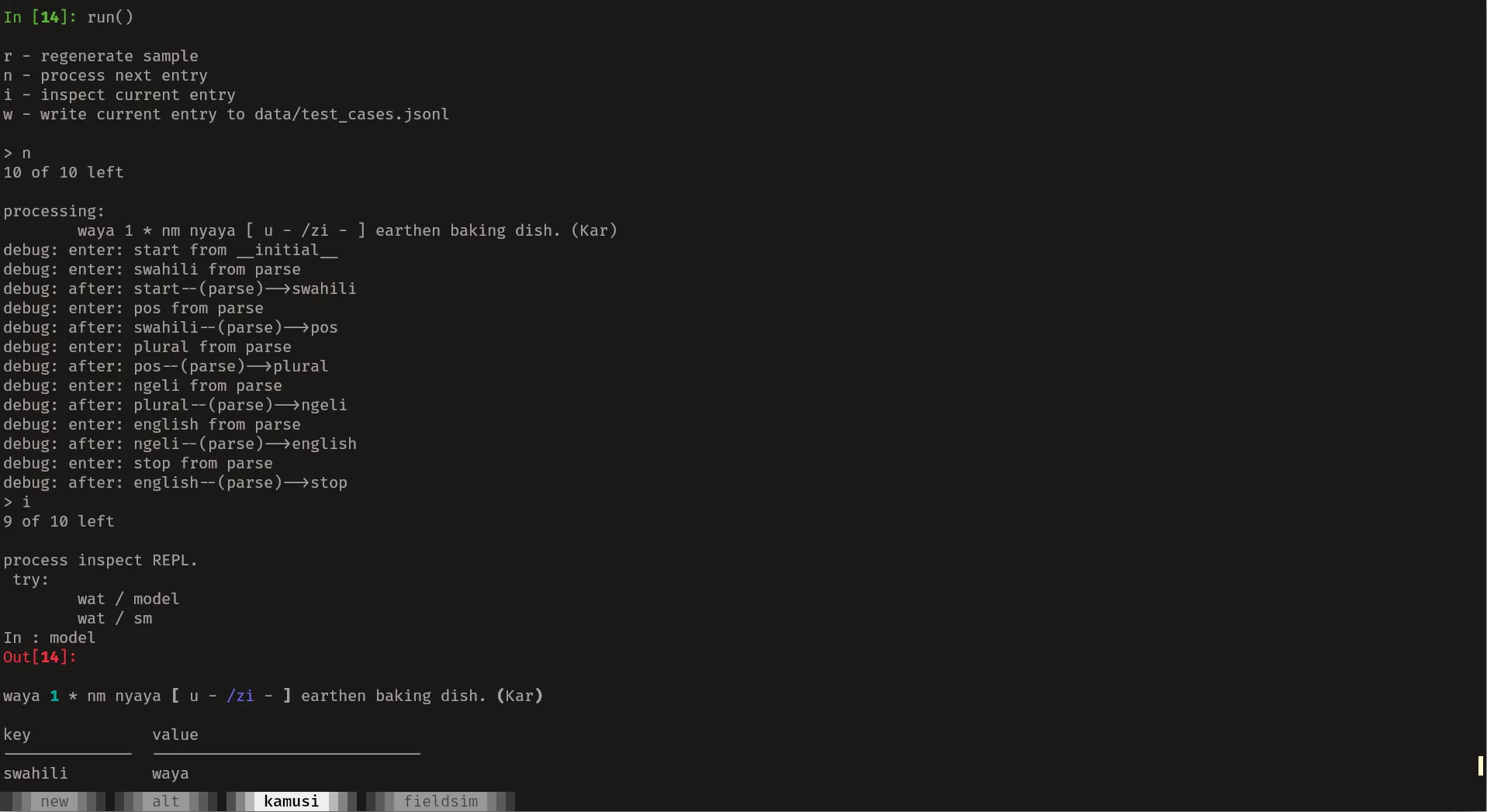
The actual ‘main’ function runs process on each entry, collects some statistics and saves the
parsed data all with a nice progress bar:
from tqdm import tqdm
from rich.pretty import pprint

def main():
    entries = read_parts_as_entries()
    stats = {"succeeded": 0, "failed": 0}
    fp = open("data/swahili-english-dict.jsonl", "w")
    fp2 = open("data/failed_stream.jsonl", "w")
    id_ = 1
    for entry in tqdm(entries):
        try:
            de = process(entry)
            if de.parse_ok and len(de.stream) < 3:
                d = asdict(de.entry)
                d["id"] = id_
                s = json.dumps(d) + "\n"
                fp.write(s)
                stats["succeeded"] += 1
                id_ += 1
            else:
                s = json.dumps(entry) + "\n"
                fp2.write(s)
                stats["failed"] += 1
        except Exception as e:
            s = json.dumps(entry) + "\n"
            fp2.write(s)
            stats["failed"] += 1
    fp.close()
    fp2.close()
    pprint(stats)
We can see a sample result with:
shuf data/swahili-english-dict.jsonl | head -1 | jq{
"swahili": "warsha",
"swahili_alt": null,
"part_of_speech": "nomino (noun)",
"plural": null,
"ngeli": "i-zi-",
"english": ["workshop."],
"examples": [["warsha ya uandishi", "writers’ workshop"]],
"alternates": null,
"id": 13023
}An additional transformation is carried out on the results to clean up the entries for presentation.
I’ll omit that code here since it’s some string munging. It can be seen in the kamusi.py file in
this project’s repo.
Presenting the data
With the entries finally extracted from the PDF file, we can use it through a more convenient
interface. One way to do this is to make use of DuckDB’s Full-Text Search functionality. We load the
dataset then build an index on the swahili and english fields by running the following SQL
statements.
create or replace table kamusi as
  select *
  from
  read_json_auto('data/swahili-english-dict.jsonl', format = 'newline_delimited');

pragma create_fts_index('kamusi', 'id', 'swahili', 'english');
We can search the index as follows:
SELECT
    sq.id,
    sq.swahili,
    ka.swahili_alt,
    ka.plural,
    ka.part_of_speech,
    ka.ngeli,
    sq.english as english,
    ka.examples as examples,
    ka.alternates as alternates,
    score
FROM (
    SELECT *, fts_main_kamusi.match_bm25(
        id,
        'workshop',
        fields := 'english'
    ) AS score
    FROM kamusi
) sq
INNER JOIN kamusi ka ON ka.id = sq.id
WHERE score IS NOT NULL
ORDER BY score DESC;
The results with .mode = line set in DuckDB are:
id = 3991
       swahili = karakana
   swahili_alt =
        plural =
part_of_speech = nomino (noun)
         ngeli = i-zi-
       english = [workshop.]
      examples =
    alternates =
         score = 4.412508423086409

            id = 13023
       swahili = warsha
   swahili_alt =
        plural =
part_of_speech = nomino (noun)
         ngeli = i-zi-
       english = [workshop.]
      examples = [[warsha ya uandishi, writers’ workshop]]
    alternates =
         score = 4.412508423086409

            id = 5293
       swahili = kiwanda
   swahili_alt =
        plural = vi
part_of_speech = nomino (noun)
         ngeli = ki-vi-
       english = [factory, industry, workshop.]
      examples =
    alternates =
         score = 3.4721397900793924
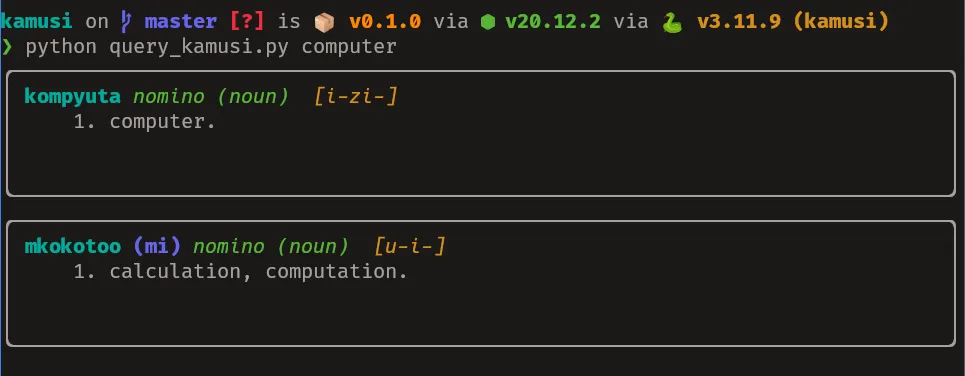
We re-use this query alongside rich to make a basic terminal UI. I use subprocess to execute the
query through the DuckDB CLI rather than the Python library mainly due to laziness.
Different DuckDB versions require you to have the extensions installed separately so rather than having to re-install extensions each time the DuckDB library is updated within an environment, I call the DuckDB CLI which is guaranteed to have everything setup correctly even after updates auto-magically.2
I’ll skip going over the code for the CLI since it’s still subject to change. Here are the results instead:
Final Thoughts
- I also made a PWA interface available here
- The full code is available here
- PDF is a real pain to work with even with all the great libraries that exist.
- The English definitions need further transformation if the dataset is to be useful in more than just a UI on top of a search index e.g finding synonyms/antonyms and idioms that map to words and vice-versa.
- DuckDB is really a great piece of software that everyone should try. I would use it for the static website but the WASM version is about 40MB which doesn’t fit with my requirements.
Footnotes
-
I use types in Python as additional documentation and seldom do type checking beyond that of the language server attached to the editor. ↩
-
The magic is a pacman hook that runs a script that installs the extensions when DuckDB is updated. ↩