Table of Contents
Open Table of Contents
What is Obsidian?
Obsidian is a note-taking tool. Although it is not open-source, it works with plain text markdown files and is local-first, minimizing the risk of vendor lock-in. Additionally, it has a couple of other great features:
- Links which allow you to create references between files
- Deeply integrated YAML frontmatter, allowing adding queryable properties to notes.
- Bases which allows creating database like views using the aforementioned properties.
- Extensive plugin ecosystem with a well documented API for developers. This is a big one; there are a lot of great plugins such as Dataview, PDF++ and Excalidraw that elevate the Obsidian experience.
- Obsidian Web Clipper which is a browser plugin that lets you highlight and save web pages.
- Obsidian CLI which is a newer feature that allows you to interact with your vault (Obsidian term note collection) through a command line interface.
For the purposes of this article we’ll be using the latter two, the Web Clipper for collecting data from IMDb and the CLI as part of our data processing pipeline.
Extracting Content From IMDb
Typically the Obsidian Web Clipper (OWC) is used to extract the content of a web page as markdown. This is great if you want to save the content of an article to read or reference later.
However, if you want to handle a website specially, you can define a template. A template allows you to define properties and their values which can be fixed or expressions evaluated in context of the web page. The expressions allow you to access a page’s schema.org variables, run CSS selectors or even run an LLM.
I won’t go over the entire process of defining a template but it usually involves figuring out the right CSS selectors and how to process the results with the Obsidian filters1. The JSON for the IMDb OWC template is as follows:
{
"schemaVersion": "0.1.0",
"name": "IMDB",
"behavior": "overwrite",
"noteContentFormat": "\n\n> `= this.overview`\n\n",
"properties": [
{
"name": "title",
"value": "{{schema:name}}",
"type": "text"
},
{
"name": "director",
"value": "{{selector: .ipc-metadata-list__item--align-end:nth-child(1) .baseAlt .ipc-metadata-list-item__list-content-item--link | unique | wikilink}}",
"type": "multitext"
},
{
"name": "genres",
"value": "{{selector: .ipc-chip--on-baseAlt | wikilink}}",
"type": "multitext"
},
{
"name": "poster",
"value": "{{schema:image}}",
"type": "text"
},
{
"name": "overview",
"value": "{{schema:description}}",
"type": "text"
},
{
"name": "rating",
"value": "",
"type": "text"
},
{
"name": "rating_imdb",
"value": "{{schema:aggregateRating.ratingValue}}",
"type": "text"
},
{
"name": "duration",
"value": "{{selector: .ipc-page-section h1 ~ .ipc-inline-list li:last-child | trim}}",
"type": "text"
},
{
"name": "last_watched",
"value": "",
"type": "date"
},
{
"name": "release_year",
"value": "{{schema:datePublished|split:\\\"-\\\"|slice:0,1}}",
"type": "text"
},
{
"name": "release_date",
"value": "{{published}}",
"type": "text"
},
{
"name": "cast",
"value": "{{selector: .ipc-metadata-list--baseAlt .ipc-metadata-list-item__content-container a | unique | wikilink}}",
"type": "multitext"
},
{
"name": "url_imdb",
"value": "{{url}}",
"type": "text"
},
{
"name": "id_imdb",
"value": "{{url | split:\\\"/\\\" | nth:5 | first}}",
"type": "text"
},
{
"name": "tags",
"value": "type/media/film",
"type": "multitext"
},
{
"name": "origin_country",
"value": "{{selector: [data-testid=\\\"Details\\\"] .ipc-metadata-list-item--link+ .ipc-metadata-list__item--align-end .ipc-btn--not-interactable+ .ipc-metadata-list-item__content-container .ipc-metadata-list-item__list-content-item--link}}",
"type": "multitext"
},
{
"name": "studio",
"value": "{{selector: div[data-testid=\\\"title-details-section\\\"] li:nth-last-child(2) ul a | wikilink}}",
"type": "multitext"
},
{
"name": "created_at",
"value": "{{date}}",
"type": "text"
}
],
"triggers": [
"https://www.imdb.com/title/"
],
"noteNameFormat": "{{schema:name}}",
"path": "008 Lists/Films/"
}
Running the template on the The Dark Knight page
---
title: "The Dark Knight"
director:
  - "[[Christopher Nolan]]"
genres:
  - "[[Action Epic]]"
  - "[[Epic]]"
  - "[[Psychological Drama]]"
  - "[[Psychological Thriller]]"
  - "[[Superhero]]"
  - "[[Tragedy]]"
  - "[[Action]]"
  - "[[Crime]]"
  - "[[Drama]]"
  - "[[Thriller]]"
poster: "https://m.media-amazon.com/images/M/MV5BMTMxNTMwODM0NF5BMl5BanBnXkFtZTcwODAyMTk2Mw@@._V1_.jpg"
overview: "When a menace known as the Joker wreaks havoc and chaos on the people of Gotham, Batman, James Gordon and Harvey Dent must work together to put an end to the madness."
rating:
rating_imdb: "9.1"
duration: "2h 32m"
last_watched:
release_year: "2008"
release_date: "2008-07-18"
cast:
  - "[[Christian Bale]]"
  - "[[Heath Ledger]]"
  - "[[Aaron Eckhart]]"
url_imdb: "https://www.imdb.com/title/tt0468569"
id_imdb: "tt0468569"
tags:
  - "type/media/film"
origin_country:
  - "United States"
  - "United Kingdom"
studio:
  - "[[Warner Bros.]]"
  - "[[Legendary Pictures]]"
  - "[[DC Comics]]"
created_at: "2026-04-19T13:08:52+03:00"
---
This is how the note looks in Obsidian
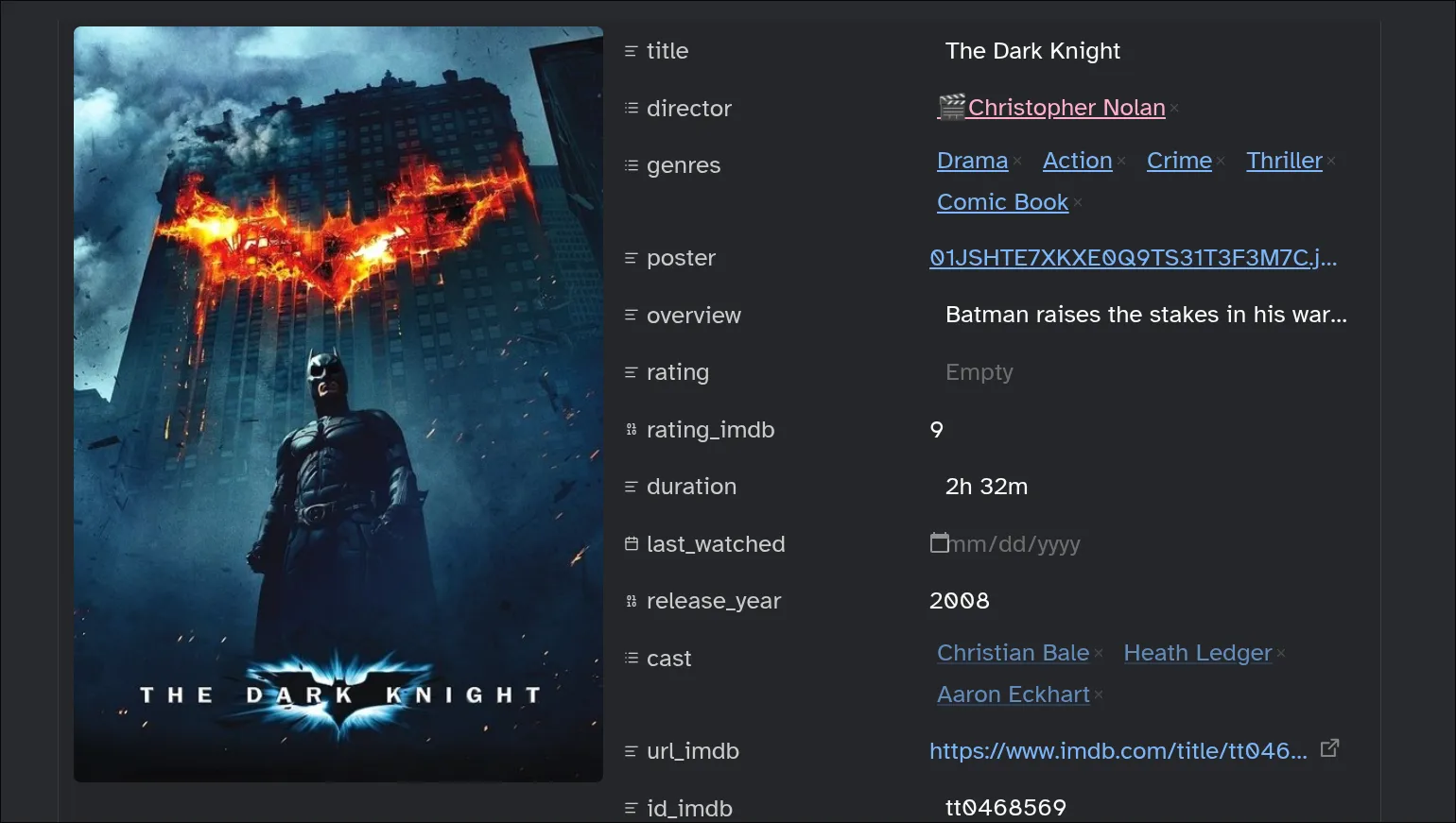
We already have most of the information we would want for a movie with just the output from the web clipper. Most of Obsidian’s power though comes from the ability to link notes together as shown in the director and cast properties which contain links to other files.
You could create the linked files manually but why do something yourself that a computer can do automatically.
IMDb Non-Commercial Datasets and DuckDB
IMDb publishes subsets of their data for personal use. We can use this to directly get data about movies and people related.
The files published include:
title.basics.tsv.gzwhich contains information of individual movies or series like the title, runtime and genres.title.crew.tsv.gzwhich contains the writers and directors for items.title.ratings.tsv.gzwhich contains the average rating and number of votes.name.basics.tsv.gzwhich contains basic information for people like birth/death year and titles they are known for.title.principals.tsv.gzwhich contains a couple of the cast members for a title.
For querying against all these files we’ll load them all into a DuckDB database. If you’ve never heard of DuckDB, it’s an in-process database similar to SQLite but purpose built for data analysis. It has a ton of amazing features and I’d recommend it to anyone who needs to do some data wrangling.
It uses a variant of SQL with several extensions some of which we’ll use here.
-- title.basics.tsv.gz
CREATE or replace TYPE titleT AS ENUM (
  'tvSeries', 'movie', 'tvMovie', 'tvSpecial', 'tvEpisode',
  'tvShort', 'video', 'short', 'tvMiniSeries', 'tvPilot', 'videoGame');
create or replace table title_basics as
  from read_csv('title.basics.tsv.gz',
      delim = '\t',
      header = 'true',
      nullstr = '\N',
      columns = {
      'tconst': 'varchar',
      'titleType': 'titleT',
      'primaryTitle': 'varchar',
      'originalTitle': 'varchar',
      'isAdult': 'bigint',
      'startYear': 'bigint',
      'endYear': 'bigint',
      'runtimeMinutes': 'bigint',
      'genres': 'varchar'
})
  where genres != 'Talk-Show'   -- Rarely useful and usually pollutes query based on primaryTitle
  order by startYear;           -- Ordered for faster filtering since primaryTitle + startYear enough to find most entries

create or replace table title_basics as
  -- convert genre to list for easier membership testing
  select * replace (split(genres, ',') as genres) from title_basics;    load.sql
Loading the rest of files works similarly. The full schema after running all
the SQL queries is visible below. (show all tables;) The full file can be found
in this gist.
| name | column_names | column_types |
|---|---|---|
| name_basics | [nconst, primaryName, birthyear, deathYear, primaryProfession, knownForTitles] | [VARCHAR, VARCHAR, BIGINT, BIGINT, ‘VARCHAR[]’, ‘VARCHAR[]‘] |
| title_basics | [tconst, titleType, primaryTitle, originalTitle, isAdult, startYear, endYear, runtimeMinutes, genres] | [VARCHAR, ‘ENUM(‘tvSeries’, ‘movie’, …)’, VARCHAR, VARCHAR, BIGINT, BIGINT, BIGINT, BIGINT, ‘VARCHAR[]‘] |
| title_crew | [tconst, directors, writers] | [VARCHAR, ‘VARCHAR[]’, ‘VARCHAR[]‘] |
| title_ratings | [tconst, averageRating, numVotes] | [VARCHAR, FLOAT, UBIGINT] |
Now that we have the data loaded, we can proceed with enriching the entries.
For this article we’ll use the case of creating the files for a director and
populating them with some basic information. Since we already know the ID for
each film which is extracted from the IMDb URL, (id_imdb) and present in the
dataset as tconst we can use it to look up the director’s information easily.
create or replace temp macro find_director(filmid) as table
  with cte as (
    select unnest(directors) as director
    from title_crew
    where tconst = filmid
)
  select
    nconst,
    primaryName,
    birthYear,
    deathYear,
    primaryProfession,
    knownForTitles
  from name_basics nb
  where nconst in (select director from cte);
I am using the CREATE MACRO statement from DuckDB which works similar
to functions from conventional programming languages.
Running the query with our target ID select * from find_director('tt0468569');
returns
           nconst = nm0634240
      primaryName = Christopher Nolan
        birthyear = 1970
        deathYear = NULL
primaryProfession = [producer, writer, director]
   knownForTitles = [tt6723592, tt0816692, tt1345836, tt1375666]
Gluing Everything Together with Python
Since we’re focusing on the Directors we should figure out exactly what information we’d like to keep track of for each director.
- Name
- Birth date
- Death date
- Nationality
- Works they are known for - Useful for linking to other items in vault
- Their primary roles they are known for e.g producer, writer or director
- URL to their IMDb page
- URL to their Wikipedia page
We cannot obtain all this information from the IMDb dataset but we’ll settle for what we can get.
Create Obsidian template for Directors
After figuring out what information we plan to track, we can create an Obsidian template to simplify the file creation process. Unfortunately Obsidian does not provide a way to bulk create a file based on a template so we’ll write a simple script.
#!/usr/bin/env bash

filepath="$HOME/kb/Notes/008 Lists/Directors/${1}.md"
echo "$filepath"
[[ -e "$filepath" ]] && exit
cdate="$(date +%Y-%m-%dT%H:%M:%S)"
cat > "$filepath" <<EOF
---
name: "${1}"
born:
died:
known_for:
nationality:
image:
wikipedia_link:
known_as:
tags:
  - type/person/director
created_at: $cdate
modified_at: $cdate
---

![[Directors.base]]
EOFcreate_director
Ignore the last line ![[Directors.base]] for now. The most important part is
the tag type/person/director which allows us to easily find the file through
the Obsidian CLI search.
Running the file can be done by finding the directors mentioned in saved movie clippings.
sed -n -E -e '/^director:/,/^[a-z]+:/p' *.md \    # find director property in YAML frontmatter
| sed -nE '/^\s+- /p' \                           # print only entry in YAML list
| grep -Eo '[a-zA-Z]+([-.a-zA-Z ]+)+' \           # match only name without quotes, list or link syntax
| sort | uniq -c | sort -n \                      # rank frequency
| grep -v 1 \                                     # filter directors with only one entry
| awk '{$1="";print $0}' | sed -E 's/^\s+//' \    # print only name
| xargs -I _ create_director "_"                  # create director file
Processing Each Director File
To process each file we need to be able to read the file’s frontmatter so we can edit it in Python.
from pathlib import Path
from ruamel.yaml import YAML

yaml = YAML()
yaml.indent(mapping=4, sequence=4, offset=2)

def read_markdown(file: Path) -> tuple[str, str] | None:
    with open(file, "r") as fp:
        yaml_section = []
        if (fp.readline().strip()) == "---":
            while (t := fp.readline().strip()) != "---":
                yaml_section.append(t)
            return "\n".join(yaml_section), fp.read()
    return

def as_yaml(t: str) -> dict[str, Any]:
    return yaml.load(t)edit_frontmatter.py
We can then query our Obsidian vault for all the director files. Then use backlinks (files that link to current file) to find the films they are responsible for before finally finding their information from the DuckDB database. The complete pipeline is:
from tqdm import tqdm

def enrich_directors():
    ds = list(Path(OBSIDIAN_BASE / "008 Lists/Directors/").glob("*.md"))
    for file in tqdm(ds):
        try:
            shutil.copy(file, file.parent / (file.name + ".bak"))
            new_content = enrich_information(file)
            if new_content:
                with open(file, "w") as fp:
                    fp.write(new_content)
            else:
                print(f"skipped {file}")
        except Exception as e:
            print(f"failed on {file}")
edit_frontmatter.py
We make a backup of the existing file in case anything happens. Before running our enrichment pipeline.
from io import StringIO
import toolz

con = duckdb.connect("movies.db", read_only=True)

def enrich_information(file: Path):
    res = read_markdown(file)
    if res is None:
        return
    front_matter, rest = res
    meta = as_yaml(front_matter)
    if "type/person/director" not in meta["tags"] or meta["known_for"]:
        return
    one_film = disambiguate_director(file)
    con.execute(
        """
        select
          * exclude knownForTitles,
          (select array_agg(format('[[{}]]', primaryTitle)) from title_basics where tconst in knownForTitles) as knownForTitles
        from find_director($filmid) d
        """,
        {"filmid": one_film, "name": meta["name"]},
    )
    more_info = toolz.first(con.pl().to_dicts())

    meta["born"] = meta["born"] or more_info["birthyear"]
    meta["died"] = meta["died"] or more_info["deathYear"]
    meta["known_as"] = meta["known_as"] or more_info["primaryProfession"]
    meta["known_for"] = meta["known_for"] or more_info["knownForTitles"]
    meta["id_imdb"] = more_info["nconst"]
    meta["url_imdb"] = f"https://www.imdb.com/name/{more_info['nconst']}"

    meta = dict(
        sorted(
            meta.items(),
            key=lambda x: math.inf if x[0] in ["created_at", "modified_at"] else 0,
        )
    )

    new_s = StringIO()
    new_s.write("---\n")
    yaml.dump(meta, new_s)
    new_s.write("---\n")
    new_s.write("\n\n")
    new_s.write(rest)

    return new_s.getvalue()edit_frontmatter.py
In the enrich_information function we query for the director’s information making sure to get the actual names of the titles instead of just IDs.
import subprocess

OBSIDIAN_BASE = Path("/path/to/vault/")

def disambiguate_director(file: Path) -> str | None:
    try:
        proc = subprocess.run(
            [
                "obsidian",
                "backlinks",
                f"path={file.relative_to(OBSIDIAN_BASE)}",
                "limit=1",
            ],
            check=True,
            capture_output=True,
            text=True,
        )
        p = OBSIDIAN_BASE / proc.stdout.splitlines()[0].strip()
        res = read_markdown(p)
        if res is None:
            return
        front_matter, _ = res
        return as_yaml(front_matter)["id_imdb"]
    except subprocess.CalledProcessError:
        return
edit_frontmatter.py
This one is a simple query for the backlinks to a director file since it’s easier to find the director’s information through a title. We return the title’s IMDb ID directly. We can run the pipeline and inspect the results.
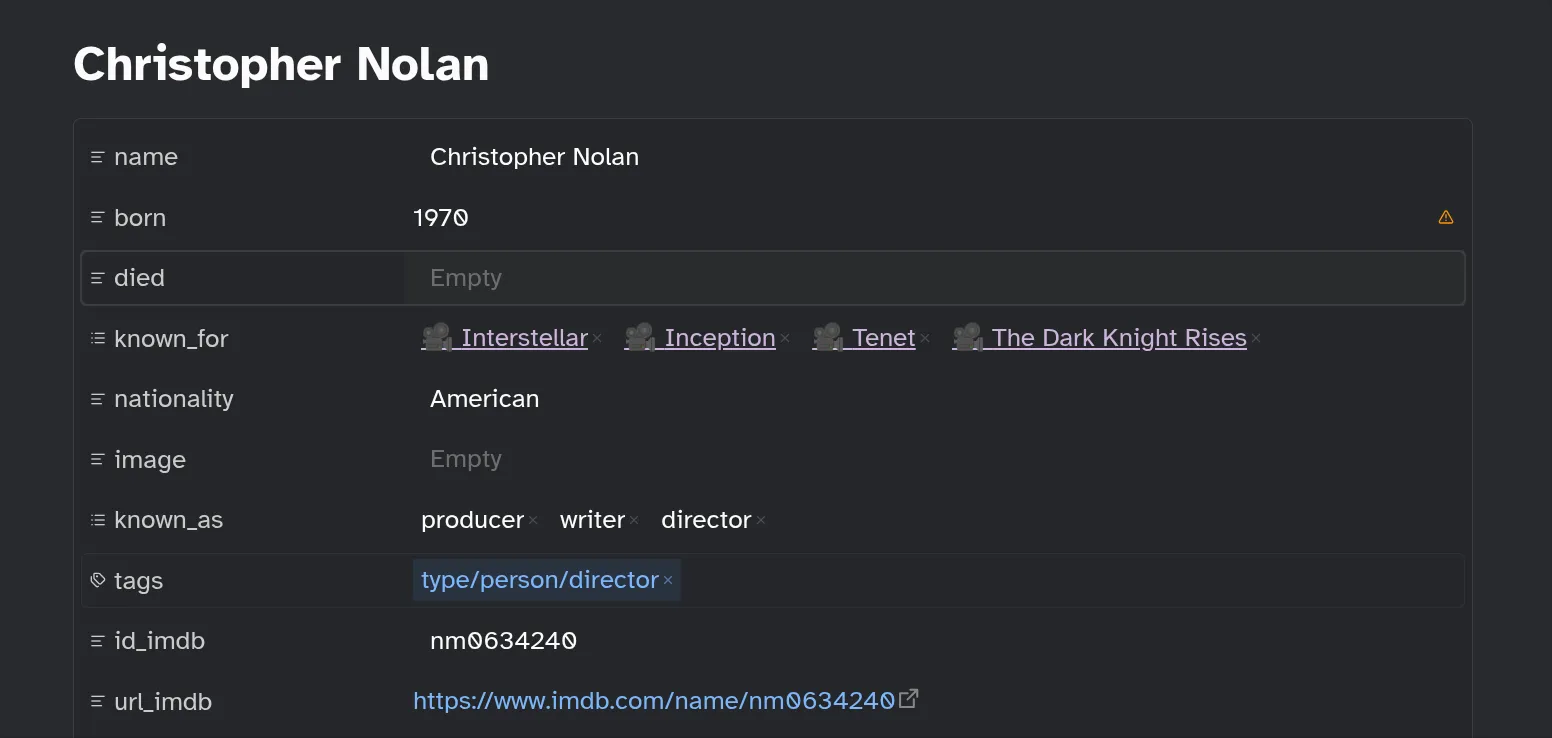
We can proceed to fill in any missing information completing the metadata
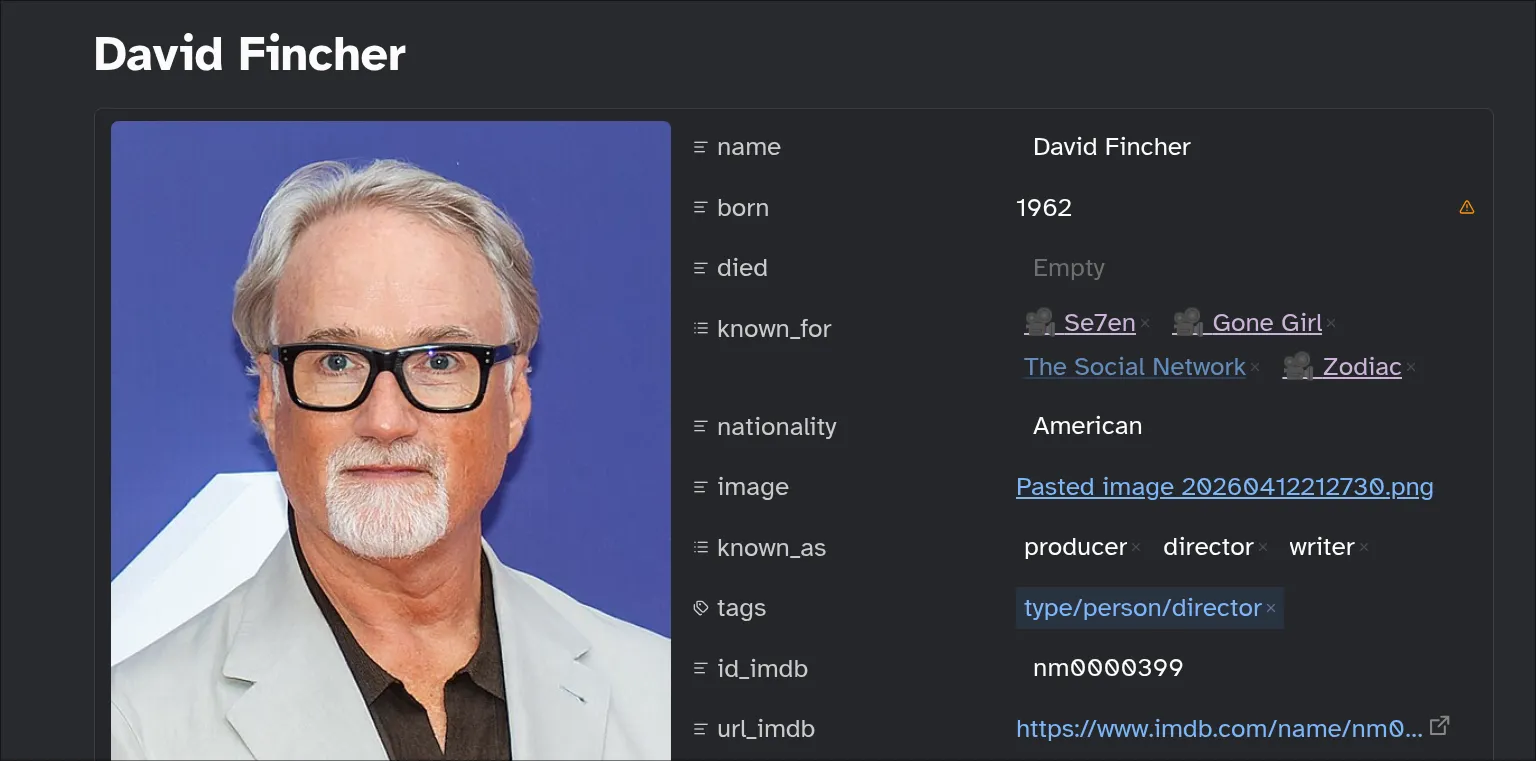
The Final Piece - Obsidian Bases
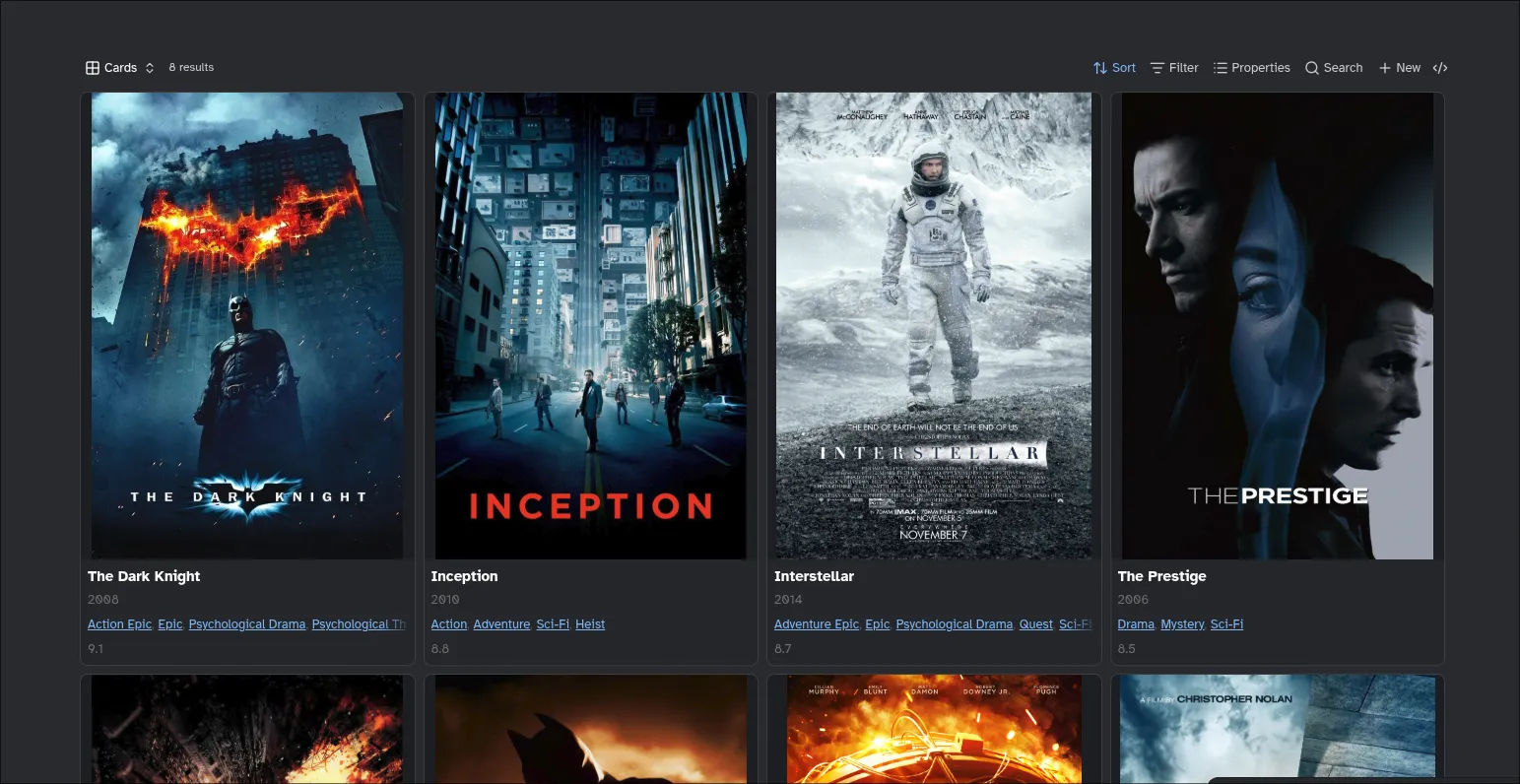
Earlier I skipped over the ![[Directors.base]] line of the template. This line
is an embedded Obsidian Base which provides a database like view to notes. In
this case we use it to nicely display the titles in our vault belonging to a
director.
The important part is I use the current file as part of the query so the Base shows different values for different directors. You can read about this in the docs here.
filters:
  and:
    - file.hasTag("type/media")
    - director.contains(this.file.name)
formulas:
  num_rating: |
    number(rating_imdb)
  Rating: number(rating_imdb)
  Poster: image(poster)
  Release: number(release_year)
  Genres: genres.join(", ")
views:
  - type: dynamic-views-grid
    name: Cards
    order:
      - file.name
      - formula.Release
      - genres
      - formula.Rating
    sort:
      - property: formula.Rating
        direction: DESC
    id: dxwma1-Cards
    propertyLabels: hide
    imageProperty: note.poster
    imageFormat: cover
    imagePosition: top
    fallbackToContent: false
    imageFit: contain
    imageRatio: 1.4
    minimumColumns: one
  - type: table
    name: View
    order:
      - formula.Poster
      - file.name
      - formula.Release
      - formula.Rating
      - genres
    sort:
      - property: cover
        direction: ASC
      - property: file.ctime
        direction: DESC
    image: note.poster
    cardSize: 350
    imageAspectRatio: 1.35
    rowHeight: extra
    columnSize:
      formula.Poster: 179
      note.genres: 404
      formula.Rating: 166
Directors.base
The section is rendered in the Christopher Nolan file like below:
Final Thoughts
In this article, we have begun on our journey of a complete Film catalog with
Obsidian. We can now open a Director’s file and be able to see some basic
information as well as easily discover new films through the known_for
field.
We can apply the same strategy to the rest of the cast and push the data enrichment even further. We’ll be exploring this in the second part of this article.
Further Reading
- We have barely scratched the surface of DuckDB in this article. There are a lot more interesting features.
- A guide by Obsidian CEO on creating a Movie Database with Obsidian.
- SQL and Python source used in this article can be found on GitHub Gists
- The last screenshot is using a view from the Dynamic Views plugin instead of the builtin card view.